
Description
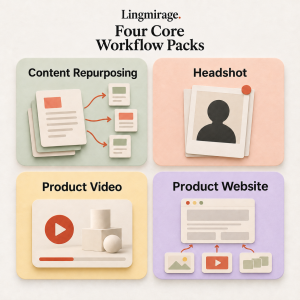
Explore the four core workflow packs in the Everyday AI Skill Bundle. See the bundle page for current pricing and included files.
PLAN A PRODUCT PHOTO TO FRAME-SEQUENCE WEBSITE
This advanced workflow pack helps you plan a product presentation, review candidate assets, extract an accepted local video into ordered images, and specify a website implementation for your coding agent.
Here, 3D-style presentation means a pre-rendered sequence of two-dimensional frames. The paid pack does not reconstruct a photo into a 3D mesh or include a completed website. The free native-geometry viewer below is a separate example.
WHAT THIS WORKFLOW COVERS
- A factual product brief with source, rights, audience, stack, motion purpose and release owner.
- Editable keyframe and motion requests, plus a comparison worksheet to reject changed or uncertain product details. Prompts do not guarantee preservation of logos, packaging, proportions or features.
- An original local Python/FFmpeg utility for extracting an accepted clip into a new directory with an ordered frame manifest. Existing output directories are refused.
- Implementation instructions for frame playback, a static poster, manual keyboard controls, reduced motion and failure handling. Your agent must build and test the actual site.
- A release checklist for actual device, layout, loading and deployment checks; these are review tasks rather than certified website features.
THE 5-STEP WORKFLOW
- BRIEF – Establish product facts, asset rights and a supported visual scope.
- ASSETS – Use approved photographs or review generated candidates against real product evidence.
- FRAMES – Extract an accepted local video and inspect its manifest and images.
- WEBSITE – Ask your agent to implement bounded frame playback with usable controls and fallbacks.
- REVIEW – Test the actual build and obtain project-owner approval before deployment.
WHAT YOU DOWNLOAD – VERSION 1.1
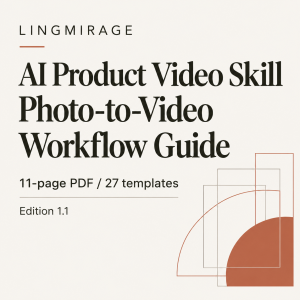
- A nine-page PDF workflow guide.
- A skill instruction ZIP with a README, SKILL.md, agent display metadata and five editable prompt templates.
- An implementation checklist and three blank CSV worksheets for the brief, asset review and release checks.
- An original Python frame-extraction utility, a changelog and a bounded testing note.
BEST FOR
Advanced creators, freelancers and client teams who can inspect code and want a structured photo-to-video-to-frame-sequence website workflow.
REQUIREMENTS AND LIMITS
Local extraction requires Python 3.9 or newer, FFmpeg and ffprobe, plus a rights-cleared local MP4, MOV, MKV or WebM. Website development needs an appropriate coding agent and project stack. Image/video generation services, accounts, credits, assets and hosting are separate; the whole workflow is not promised to be free or finished within a fixed time.
AI generation, product identity preservation, specific-agent installation, a completed client website, deployment and end-device performance have not been certified by the extraction tests. Read the guide and the ZIP’s testing note before use.
DELIVERY & LICENSE
Instant digital download after purchase. Use the workflow for your own or client projects. Redistribution or resale of the skill files is not permitted.
Want all 4 packs? See the bundle page for current pricing and included files.
Explore the four-pack bundle →
Free native 3D viewer source
Explore a fictional box built from native 3D geometry: rotate and tilt it, change its color, zoom, and reset the view. This separate learning example uses Three.js. It does not reconstruct your product from a photo and does not demonstrate or validate the paid photo-to-video-to-frame-sequence workflow described above.
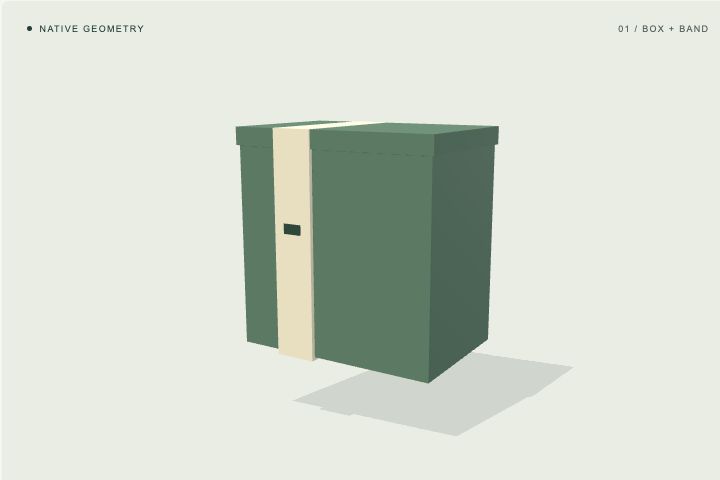
Download the free viewer source ZIP
The ZIP contains 9 files, including the original HTML, CSS, JavaScript, a local copy of Three.js, and a README. No purchase or email form is required for this download.
Run the sample locally
- Extract the ZIP and open a terminal in the
lingmirage-geometry-viewer-v1folder. - With Python 3 installed, start the local server below.
- Open
http://127.0.0.1:8000in Chrome with WebGL2 and JavaScript available. Serve the files over local HTTP rather than openingindex.htmldirectly.
python3 -m http.server 8000 --bind 127.0.0.1Drag horizontally or use the buttons and keyboard controls. Vertical touch gestures scroll the page; pinch gestures zoom the page. If 3D cannot run, the static illustration remains available. The sample needs no build step, API key, or account; Python and Chrome are separate tools.
Use the original sample for yourself, your team, or client work under the usage terms in its README. The README also separates the bundled Three.js MIT license from the original sample terms. Paid workflow files and generation-tool credits are not included.

Reviews
There are no reviews yet.