Description
Your Claude Skill Isn’t Loading? Start with the Description and Test
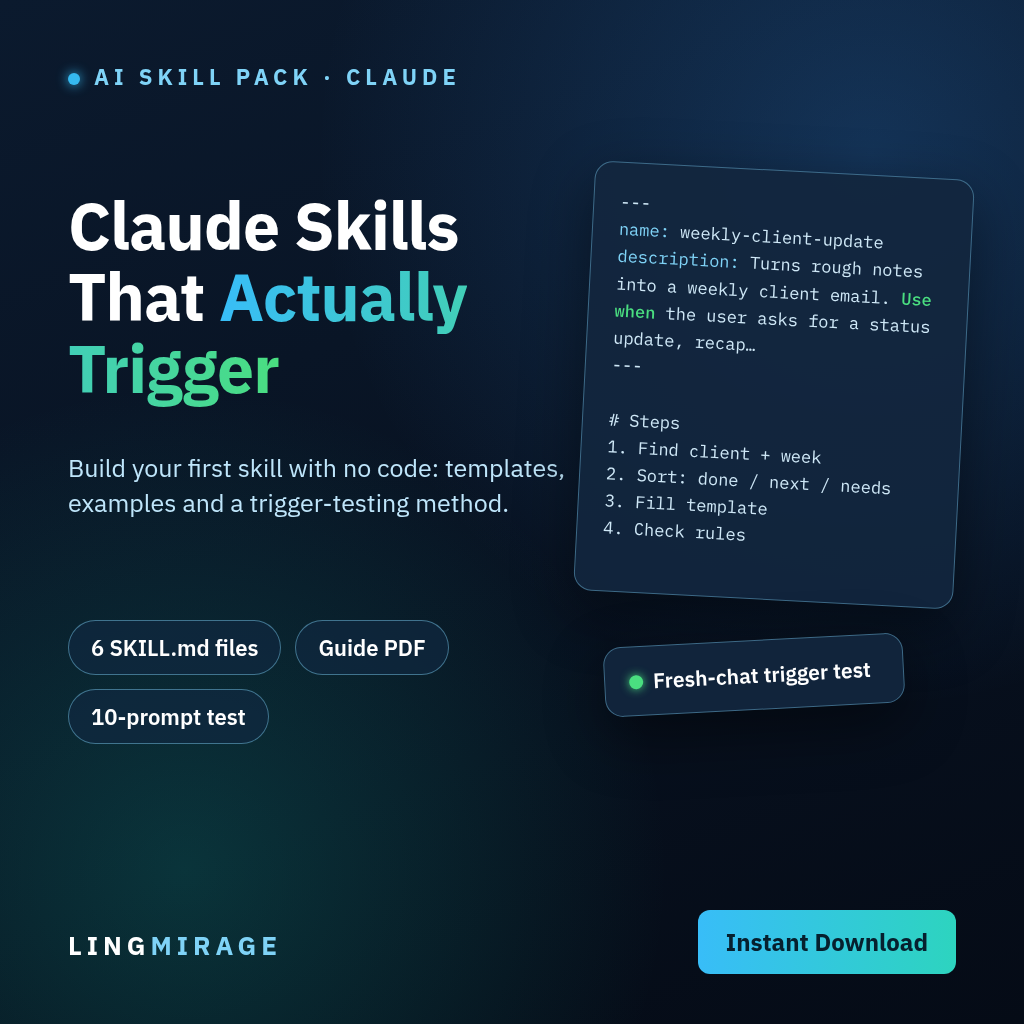
You wrote a skill for your report format, checklist or house style, but Claude does not seem to use it. Start by checking the description: it helps Claude decide when the skill applies. Also review whether the skill is enabled, how it is packaged and whether the instructions are clear. This no-code kit provides templates and a fresh-chat testing process to help you build and refine the skill for your own requests.
- Description-writing formula: what it does + “Use when…” situations + the words you actually type + a “Not for…” boundary to test.
- Fill-in SKILL.md templates: report format, review checklist and brand voice. Replace the brackets with your requirements, then test and refine.
- A skill that writes skills: install the builder, describe your routine, and it interviews you and drafts the SKILL.md.
- Fresh-chat testing method: 10 prompts (obvious, lazy, near-miss) plus a test log to record when the skill loads, when it does not and what to revise.
- Clean packaging: correct folder-in-ZIP structure, ready-made example ZIPs, and how to avoid hidden
__MACOSX/.DS_Storeupload errors.
WHAT’S INSIDE THE ZIP
- Claude Skill Authoring Guide (PDF, 9 pages): skill structure in plain words, why skills don’t fire, writing the description, writing the body, testing, packaging and installing, a troubleshooting table and three worked before/after rewrites.
- Description Trigger Checklist (PDF, 2 pages): an 11-point score sheet plus a fill-in formula and test grid.
- skill-builder-interview/: a meta-skill that interviews you and drafts a complete SKILL.md, with a reference file of description patterns.
- 3 templates:
report-format,review-checklist,brand-voice, each with fill-in instructions. - 2 complete example skills:
weekly-client-update(with an email template asset) andmeeting-notes-to-actions. - ready-to-upload/: the builder and both examples already zipped correctly.
- testing/: trigger test prompts, a CSV test log (opens in Excel or Google Sheets) and a troubleshooting table.
WHO IT’S FOR
Knowledge workers, creators, consultants and small-business owners who use Claude but don’t write code, and who are tired of re-explaining the same format, checklist or style in every chat. If you’ve ever asked “is there an idiot’s guide to Claude Skills?”, this is it.
WHO IT’S NOT FOR
Developers looking for script-heavy or API-based skill engineering. This kit has no code and needs none. It’s also not a big library of generic pre-made skills; it teaches you to build the ones that fit your work.
REQUIREMENTS
Access to Claude with Skills available on your plan (Claude apps), or Claude Code. Skill availability and menu names depend on Anthropic’s plans and may change; the guide explains what to look for. A computer that can open ZIP and PDF files.
FAQ
Do I need to know how to code?
No. Every file is plain text or PDF. You fill in templates and write descriptions in normal English.
Why doesn’t my Claude skill trigger?
A description that names only a topic may not communicate when the skill should apply. It is one thing to check alongside enabling the skill, packaging and instruction clarity. Use the checklist and test log to try several matching and near-miss requests, then revise based on what you observe. No description formula guarantees activation on every request.
Does the kit cover Claude apps and Claude Code?
The guide covers uploading skill ZIPs in Claude apps and placing skill folders in Claude Code. Check the current instructions for your environment and test the skill there; a shared file format does not establish that every workflow works unchanged in both environments.
Which ZIP should I upload?
The main download contains the whole kit. The ready-to-upload/ folder contains the packaged builder and example skills. Review the files before enabling them; fill in and test the templates before packaging your own skill.
Is this affiliated with Anthropic?
No. Lingmirage is independent. Check Anthropic’s current documentation alongside the guide when building and testing your skill.
Is it a subscription?
No. It’s a one-time digital download.
DELIVERY & LICENSE
Instant digital download after payment: one ZIP file (about 0.2 MB). Use it for yourself and your team, and use the skills you build for client work. Please don’t resell or redistribute the kit itself.

Reviews
There are no reviews yet.